
2.10. Programming: Assistance in selected tasks
Learn to program code without AI writing code
Subject: Programming · Grade: 9 (age 14–15) · Duration: 1 double lesson (90 min) · AI: Assistance WITH AI
| AI-related competencies (DUAL.AI.TEACHer Framework) – teacher level | Subject-specific learning objectives – student/learner level |
|
AF-TL-2b (AI foundations and applications × Teaching & Learning, Level 2 – Reflective Implementation):
“Teachers can organise lesson elements that embed AI use with clear pedagogical roles and strategies to verify the output elements.”
AF-FC-2b (AI foundations and applications × Facilitating Learners’ (AI) Digital Competence, Level 2 – Reflective Implementation):
“Teachers can implement guidance that helps learners developing practical AI skills, adapting the tasks to learners’ prior knowledge and the AI tools available.” |
By the end of the lesson, students can:
|
Take-home message: Students need to know the basics of programming if they want to evaluate the results given by a model. So students in the first steps of learning programming must use AI models to do supportive and repetitive tasks related with programming, but not use them to produce code. They can also use the model to ask for possible improvements in the code, so students can test their programming abilities.
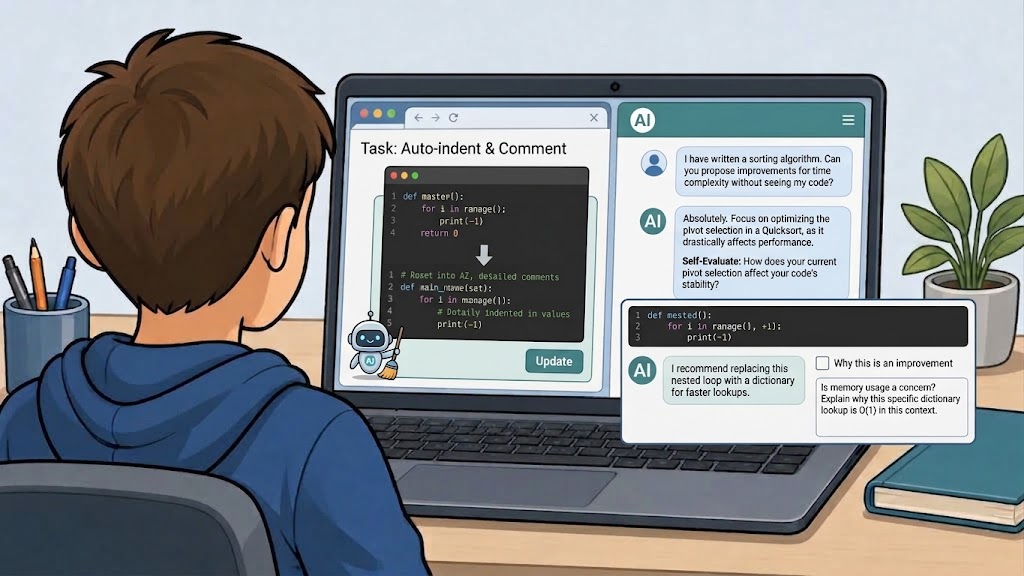
Fig 1. Image generated with Gemini (3.6 Thinking), September 8, 2026.
Content
Programming education is changing in a context where AI systems can generate, explain, and review code. While these tools offer new opportunities for learning, they also introduce an important educational challenge: students need sufficient programming knowledge to evaluate whether an AI-generated suggestion is correct, efficient, or even relevant to the task at hand. Without a basic understanding of programming concepts, students may accept incorrect solutions, overlook errors, or fail to recognize better alternatives. For this reason, learning programming fundamentals remains essential, even when AI tools are available.
In introductory programming courses, AI should be positioned as a learning support tool rather than as a substitute programmer. Students can use AI effectively for repetitive or low-level tasks that do not reduce the cognitive effort involved in learning to program. Examples include formatting and indenting code, generating documentation comments, explaining error messages, summarizing syntax rules, or helping students understand the purpose of specific programming constructs. These uses allow students to focus their attention on the underlying logic, algorithms, and problem-solving processes that are central to programming competence.
Another productive use of AI is code review. Instead of asking an AI model to write a solution, students can write their own code first and then ask the model to identify potential improvements. The AI might suggest clearer variable names, better code organization, reduced redundancy, improved readability, or alternative approaches that the student can evaluate independently. This transforms the AI into a feedback partner, allowing students to compare their own reasoning with external suggestions and assess the strengths and weaknesses of their solutions.
However, AI-generated feedback should not be accepted uncritically. Models may recommend changes that are unnecessary, inefficient, or based on incorrect assumptions about the code's purpose. A central goal of this lesson is therefore to develop students' ability to critically evaluate AI suggestions. Students will learn to ask an AI model not only what improvements it proposes, but also why it considers those changes beneficial. By comparing the model's reasoning to established programming principles, students can judge whether the proposed optimization genuinely improves the code or merely represents a different design choice.
This lesson treats AI as a tool that supports reflection, self-assessment, and code quality improvement rather than code generation. Students practice writing their own programs, using AI to perform supportive tasks, requesting feedback on their work, and critically analyzing the quality of the responses they receive. The ultimate objective is to help students become both better programmers and more informed users of AI systems.
Lesson plan
| Phase | Time | Activity |
| Introduction | 8 min | The teachers shows an unlabelled graph of a real predator–prey data series (e.g. lynx/hare); students describe the pattern and form first hypotheses. |
| Input | 12 min | The teacher introduces the model’s variables and parameters using a simple diagram (no differential equations needed). |
| Exploration | 15 min | Students test their hypotheses in pairs on a ready-made HTML simulation and record their observations. |
| Adaptation | 35 min | In pairs, students work through 2–3 rounds of predict → prompt → test → diagnose (guiding questions below), each time asking the LLM to add one more layer of ecological realism to the simulation (a limit on the prey's food supply, a second species, a seasonal/abiotic factor) until the clean two-variable cycle visibly breaks down. |
| Reflection | 20 min | Whole-class discussion, guided by questions such as: At which round did the simulation stop producing a clean, repeating cycle? What does the original model deliberately leave out, and why? What makes it a useful simplification rather than simply a wrong one? |
Guiding questions: layering complexity
Pairs work through as many of the following rounds as time allows in the 35 minutes (most manage two; the third is an extension for early finishers). Each round follows the same four-step cycle:
- Round 1 — limit the prey's food supply (a carrying capacity):
- Predict: Before you start prompting, aks yourself: what do you expect to happen to the cycle if the prey's growth slows down once the population gets large, instead of growing without limit? Sketch the curve you expect.
- Prompt: Ask the AI to add a maximum sustainable prey population to the simulation, and to explain in its own words how it changed the growth equation to do this.
- Test & compare: Run the new simulation with the same starting values as before. Compare the previous simulation with the new one: how did the variables change? Why is that?
- Diagnose: Which assumption of the original model (unlimited food for the prey) did you just remove? Is this factor biotic or abiotic?
- Round 2 — add another (biotic or abiotic) factor:
- Predict: If a third species now competes with the prey for food, or preys on it as well, or if prey growth now depends on temperature what do you expect this to do to the original two-species cycle?
- Prompt: Choose another factor and write a prompt asking the AI to add it as a new variable linked to the existing ones — specify exactly how it should interact with the prey or predator population.
- Test & compare: Observe the simulation over several cycles. Does the original two-species rhythm survive, get distorted, or disappear?
- Diagnose: The original model assumed each population depends only on the other. Is that still true after this round? What real ecological relationship does your new factor represent.
- Optional round 3 — introduce randomness:
- Predict: If one parameter (e.g. the predation rate) is no longer fixed but drawn randomly within a range at each time step, what do you expect for the long-term stability of the populations?
- Prompt: Ask the AI to replace one constant parameter with a randomised value and to keep track of whether either population reaches zero.
- Test & compare: Run the simulation several times with the same settings. Do you get the same result every time? Does either population ever collapse?
- Diagnose: Why can the same “average” parameter values sometimes lead to extinction here, when the deterministic model never predicted that?
Closing question (for the Reflect phase): At which round did the simulation stop producing a clean, repeating cycle — and what does that tell you about how many real-world factors the original Lotka–Volterra model has to leave out in order to stay solvable and easy to interpret?
Materials
- One laptop per student pair, with a browser
- Access to an LLM chat interface via the internet, or a locally installed model if internet access is restricted at school
- Ready-made HTML predator–prey simulation (single file, sliders for selected parameters)
- A short prompting / worksheet template for the “layering complexity” rounds (predict → prompt → test → diagnose)
- Guiding questions for the exploration phase and the Nature-of-Science reflection (model purpose vs. model limits)